Event Opportunities
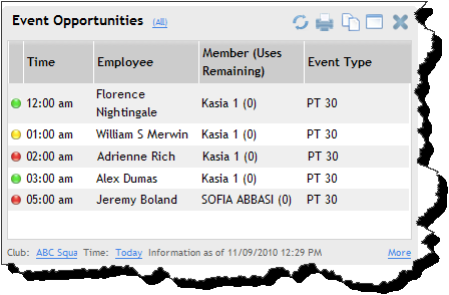
The Event Opportunities item shows clients scheduled for events today or tomorrow who are candidates for purchasing additional events.
For more information about using the DataTrak Scheduler, see the Scheduler topic of DataTrak Help.
Opportunities are classified as Low, Medium, or High. Opportunity levels are displayed on the item by color. For more information about opportunities, see the Opportunity Level Setups topic of DataTrak Help.
Classify opportunities from the Edit Event page. From the Calendar, click the Event name, and then use the Opportunity menu to set an opportunity level.
The following image shows an example of the Event Opportunities item.
The following table shows the filters and settings available for the Event Opportunities item.
|
Sidebar menu Category |
Sales/Receivables Members |
|
Club Selection |
Multiple |
|
Timeframes |
Today Tomorrow |
|
Opportunity Level Filters |
All Low Medium High |
|
Employee Filters |
All Employees By Department By Individual Employee (must select Department First) |
|
More Links |
Calendar (Schedule>Calendar) Manage Event (Schedule>Events) |
 © 2024 ABC Fitness Solutions, LLC.