Setting Hand Off and Conversion to Complete an Event
Events with an opportunity set (Low, Medium, and High) may also require you to set hand off and conversion before completing the event on the calendar.
To activate the club setting to require hand off and conversion, contact ABC Technical Support. An ABC representative must turn on the setting for the club.
The default opportunity level is set per event.
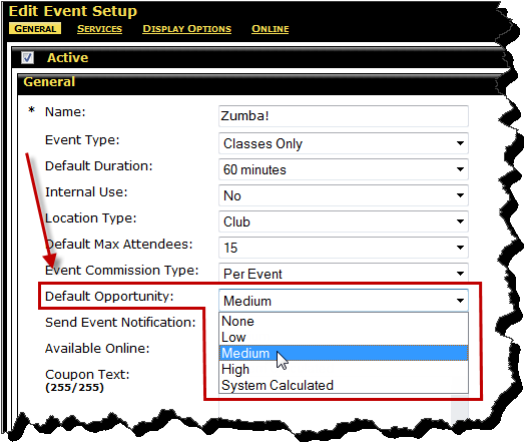
To set hand off and conversion for an event
- Set Hand Off to Yes or No.
If the Hand Off is not set, an error message will appear as shown below.
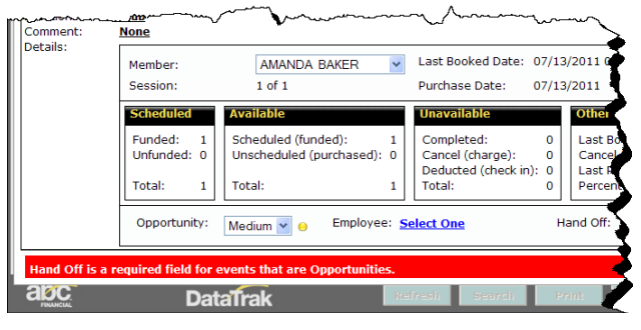
- Select an employee (only required if Hand Off is set to Yes).
If the Hand Off is set to Yes, but an employee has not been selected, an error message will appear as illustrated in the following image.
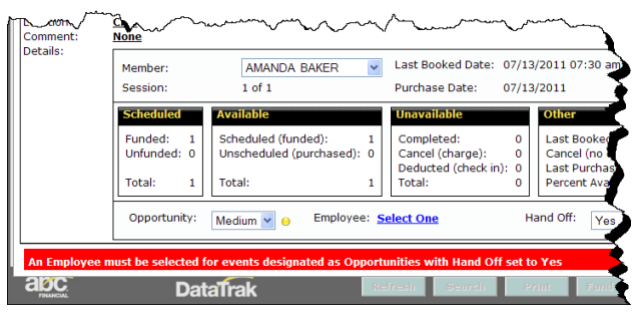
- Set Sold to Yes or No.
- Click to complete the event.
- Have the member swipe or enter their PIN.
The event is completed.
 © 2024 ABC Fitness Solutions, LLC.