Salespersons Dashboard
Summary
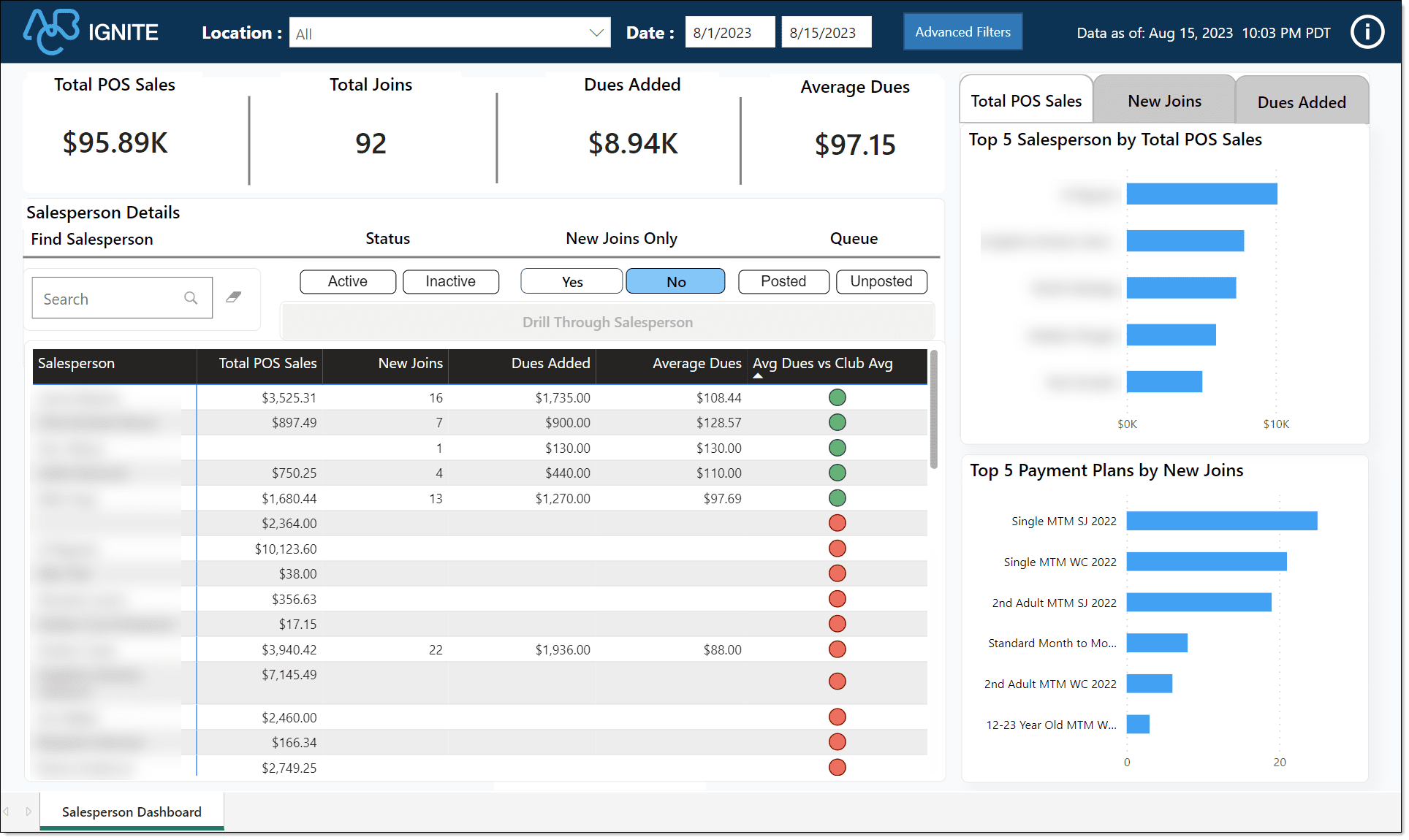
The Salespersons Dashboard shows how your employees are performing and impacting your business. This dashboard is essential for tracking and analyzing the effectiveness of your sales efforts and making informed decisions to optimize sales strategies.

|
Tip: This dashboard supports both billing platforms, Commerce and legacy iSeries. |
When to Use
Use this dashboard to learn more about the sales performance of your sales team or individual salespersons. At a basic level, it helps you answer the following questions:
-
Are my sales employees enrolling new members?
-
Who are my top sales employees?
Then, dig deep into the details and compare, for example, the top five employees by total POS sales amount, total joins, or payment plans. You can do that and more.
Key Performance Indicators (KPIs)
This dashboard includes the following key metrics and charts.
Key Performance Indicators (KPIs)
-
Total POS Sales: Shows the total amount collected for all transactions at the point of sale (POS).
-
Total Joins: Shows the number of members who joined the club during the selected date range.
-
Dues Added: The total dollar amount of new dues subscriptions for the selected date range.
-
Average Dues: The average dollar amount members are paying for dues. This KPI is calculated by dividing the total Dues Added by the total New Joins.
Charts
Top 5 Salesperson by Total POS Sales, Total Joins, and Dues Added: Compares the top five employees by total sale amount and by sales category.
Top 5 Payment Plans by New Joins: Shows the top five payment plans new members chose during the selected date range.
Salesperson Details: Shows detailed data about all sales employees. You can customize this view by searching for a person, selecting or changing employee status, new joins only sales, and by queue. Filter the details by:
-
Status: Salesperson status can be active or inactive.
-
New Joins Only: Salesperson has more than zero new joins.
-
Queue: Posted or unposted.
Essential Definitions
Join
New - The normal entry path for agreements in Member Engagement using EAE or Online Signup.
Convert - The process used when converting a prospect to a member in Member Engagement.
Fast Add - The process of quickly adding a member in Member Engagement without using EAE or Online Signup.
(Blank) - Blank exists for new ABC clients who have imported their data from another company to ABC Fitness Solutions.
The sign date is the join date. If the sign date is blank, the begin date is the join date.
Agreements in deleted or removed queues are not included with joins.
Synonyms: New Member, New Unit, New Member Unit
Illustrations
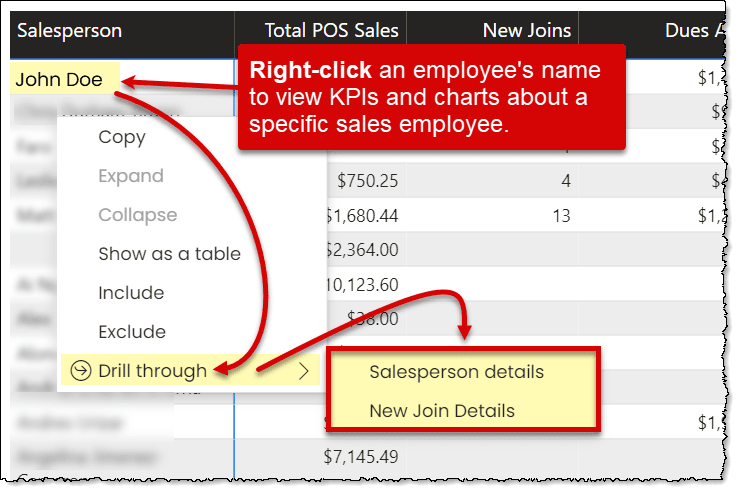
To view KPIs and charts for a specific sales employee, right click the person's name and select Drill through. Then choose Salesperson details or New Join Details.
Below is an example of the Salespersons dashboard.