MTD Club Account Activity Summary
- Report Overview
- Sample Report
- Working with MTD Invoice Totals
- Drill-Down Report
- Accessing Related Historical Activity
Report Overview
The MTD Club Account Activity Summary shows all Club Account transaction activity for the selected month(s).
This report uses different rules for presenting data than the MTD Club Account Deposit Summary .
To reconcile your deposit amount, please use the MTD Club Account Deposit Summary .
To
see reports of invoices submitted and processed, use the DataTrak Club Account reports.
Sample Report
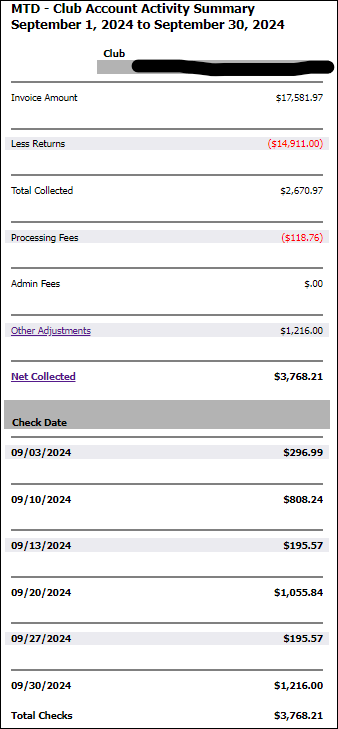
The following is an example of the MTD - Club Account Activity Summary report.
Working With MTD Invoice Totals
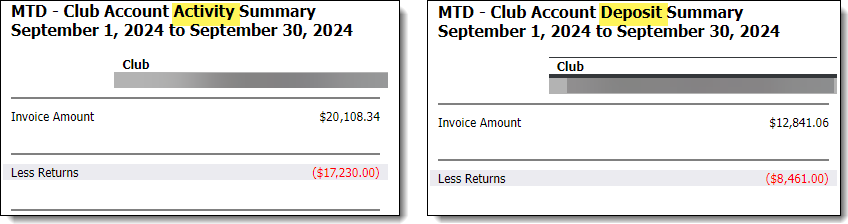
The drill-down report for the MTD Club Account Activity Summary includes invoice values. These values will be positive numbers, whether or not the activity during the specified time frame has a positive (payment) or negative (for example, a reversal or refund) impact upon the deposit made to the club.
Here is a sample of how the Invoice column reflects a refund in the detail drill-down of the MTD Club Account Activity Summary and MTD Club Account Deposit Summary reports.
Drill-Down Report
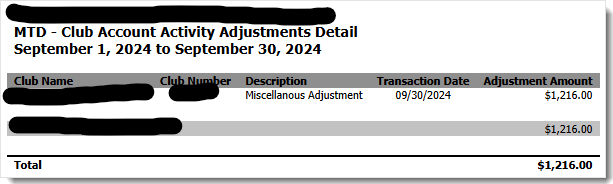
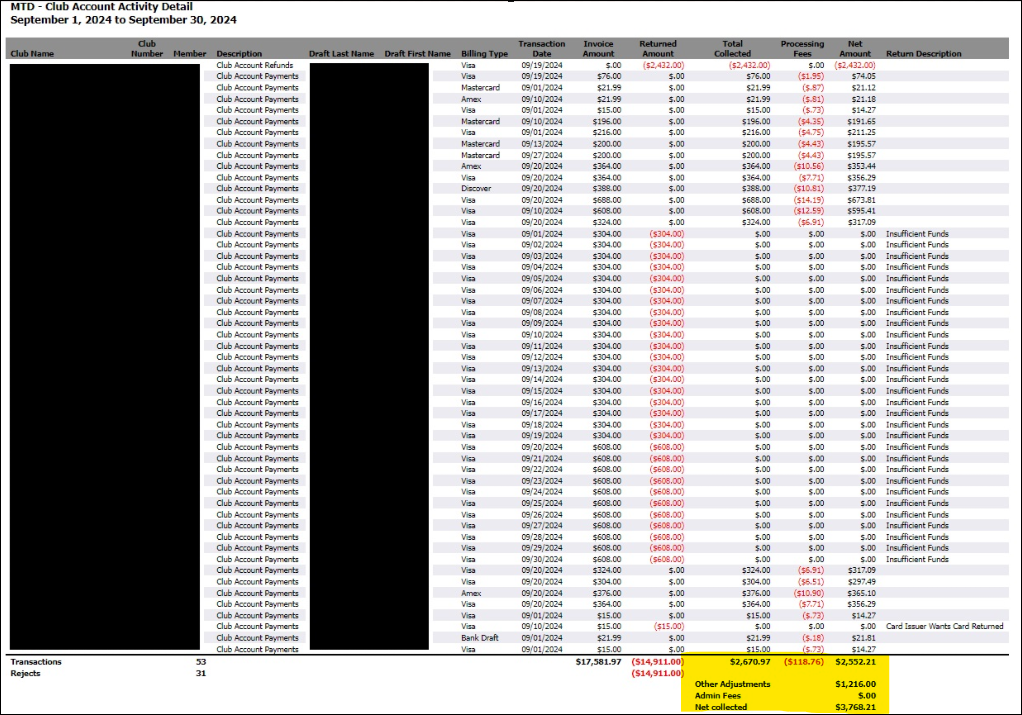
Click the Net Collected link to open the MTD Club Account Activity Detail drill-down report. It shows details of member payments reflected in the MTD Club Account Activity Summary report. If there is an adjustments line in the Summary report, you can also click the Adjustments link to open the detail of those adjustments. The adjustment line item will only appear if adjustment records exist; otherwise, these line items will not be shown. When using CSV format, adjustments detail will not be included since the adjustments are at a club level and the detail is at a member level.
The MTD - Club Account Activity Adjustments Detail is shown below.
You can use the drill-down report to access related historical activity.
Here is a sample of the drill-down report.
Accessing Related Historical Activity
You can see historical activity related to transactions such as refunds and reposts.

Any transaction linked to historical activity includes a Description formatted as a blue hyperlink within the drill-down report. Click the description to view historical information about the transaction. For example, if you select the description indicated above in the MTD Club Account Activity Detail report the related MTD Club Account Activity History report is generated.

In the example shown above, you can see the original transaction related to this chargeback. The original transaction for $408 was processed on May 7, 2014. The chargeback shown occurred on June 3, 2014. The Return Description indicates the chargeback was for service not provided or merchandise not received. You can also see that a repost was performed on July 3, 2014.
Use the Club Account Activity History report to quickly view related transactions for context.
The transaction processing date is used in this report. The processing date is not always consistent with the posting date. DataTrak reports the posting date. When you view a transaction in DataTrak the information is consistent, but the date varies slightly when the transaction date differs from the processing date.